
We asked three versions of the same constrained question: a MacBook Air M1 (2020), macOS 15, lid open, and two separate 1920 × 1080 displays at 60 Hz. One prompt allowed DisplayLink software. One prohibited display drivers. One asked generally. That distinction changed the answer a merchant should act on.
Three prompts, three answers each
| Prompt condition | Named proposals in three answers | What the count means |
|---|---|---|
| General; drivers may be required | Plugable UD-6950PDH: 2/3. Plugable UD-6950H: 1/3. | Three exact-model proposals, all Plugable. These are answer observations, not a fit test. |
| No display drivers | No driver-free dock: 3/3. Conditional brand alternatives: Plugable 2/3, StarTech 2/3, Kensington 1/3, WAVLINK 1/3. | The brands were offered only as driver-based workarounds. No exact model was named for them. |
| DisplayLink permitted | Plugable UD-6950H: 1/3. Anker 563 A8395: 2/3. | Three exact-model proposals under the software-permitted condition. |
We count a model or brand once per answer when it is positively proposed, including a stated conditional alternative. A name in a source annotation, a negative exclusion, or an unnamed category does not count. The findings CSV has 12 proposal rows: 3 general, 6 driver-free-condition alternatives, and 3 DisplayLink-permitted proposals. “No driver-free dock” is the result in all three no-driver answers; it is not a product recommendation.
The constraint that changed the result
Apple’s MacBook Air (M1, 2020) specifications list the built-in display plus one external display up to 6K at 60 Hz. That is the native-display limit for this exact laptop. It does not prove that a particular dock, cable, monitor, macOS installation, or software workaround will work.
Each driver-free answer said the fixed two-display extended-desktop request was unsupported without a display driver. The answers then named conditional DisplayLink alternatives. Those alternatives are useful leads only after the buyer allows software; they do not meet the driver-free condition. A merchant page should state this before a shopper sees a long dock comparison.
What the named models do — and do not — establish
Plugable’s UD-6950PDH page identifies a DisplayLink dock with two additional 4K60 displays and says macOS needs manual driver installation. It also says HDCP content is unsupported on macOS. Its UD-6950H page identifies a different DisplayLink model with dual 4K60 outputs, but labels that product discontinued and advises against full-screen video playback, graphics applications, and video editing. Those manufacturer records support documented limits; neither is a promise that the fixed setup will work for every buyer.
Anker’s 563 A8395 page identifies DisplayLink and a documented two-monitor 2048 × 1152 at 60 Hz combination using the second HDMI port plus DisplayPort. It says 2K monitors without 2048 × 1152 support usually switch to 1920 × 1080. We did not repeat the final answer’s broad two-HDMI claim because the official record does not establish that path. The page showed the product as sold out when checked, so this study makes no availability claim.
DisplayLink’s own macOS setup page says its Manager app and Screen Recording permission are required for DisplayLink-based products. Check the exact software requirements before promising compatibility. We did not test these docks with the stated laptop and monitors.
What Cuebase counted
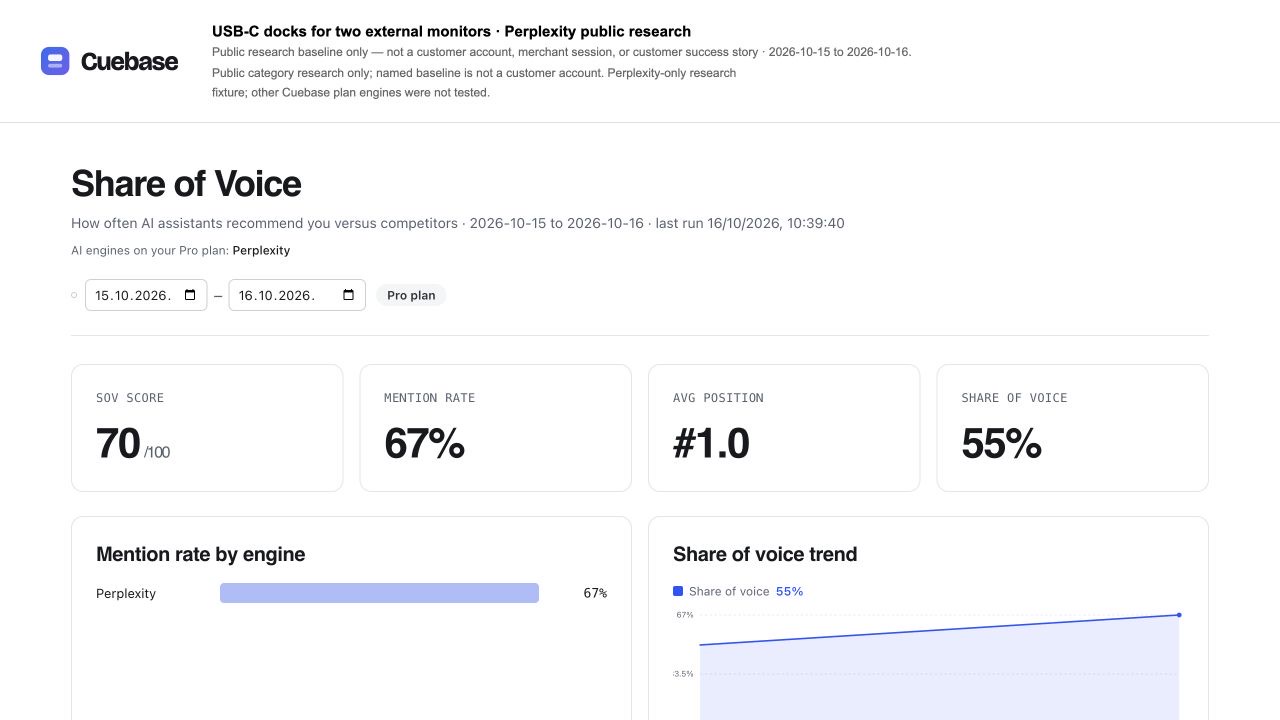
Cuebase’s isolated Share of Voice report tracked Plugable against Anker, Kensington, StarTech, and CalDigit. Plugable had a detected mention in 6/9 answers (67%). Across the 11 detected appearances in that fixed list, Plugable held 6 (55%); Anker and StarTech had 2 each, Kensington had 1, and CalDigit had 0. This is a comparison-set share, not market share, purchase intent, or a count of all brands the answers named. WAVLINK is untracked, so it is excluded from that denominator.
The automated baseline citation field was 0/9. Separately, exported source URLs were deduplicated within each answer from returned annotations, leaving 90 entries: 67 distinct URLs across 37 exact hostnames. Plugable.com appeared in 3 entries. An annotation is not proof that a source supports a model claim, and it is not the same thing as Cuebase’s automated citation field.
Turn the result into a product page that helps
- State the computer, operating system, and display condition. Do not turn “MacBook Air” into a blanket compatibility claim.
- Separate native and software-dependent paths. Name the required software and permission boundary before checkout.
- Name an exact dock revision and output combination. Do not swap HDMI, DisplayPort, or a broad product family without evidence.
- Record the prompt before you track it. In Cuebase Share of Voice, keep the setup and tracked brands fixed, then choose Run probe now. Export CSV gives the normal mention and citation metrics; retain raw-answer and product checks separately.
Method and limits
These were nine independent requests through Cuebase’s provider, probe, and summary code using Perplexity Sonar through the DataForSEO LLM Responses API. Web search was requested. The output cap was 400 tokens, and several answers ended mid-thought; no missing ending was reconstructed. Prompts requested the United States, but no provider geolocation was configured. This was not a consumer Perplexity or ChatGPT session, and no merchant or customer data was used.
Three prompts ran twice on 15 October and once on 16 October 2026; all nine completed and none failed. This is a dated, small research snapshot. It does not prove availability, price, compatibility, performance, demand, or that a change caused a later answer.
Download the original product-check findings (CSV), dated answers and sources (JSON), and the 90-entry source log (CSV). For reporting definitions, read what to count in an AI answer, AI share of voice, and the earlier pour-over kit study. Then see Cuebase’s paid AI visibility tracking.